


SimLite: Simple, mobile simulation
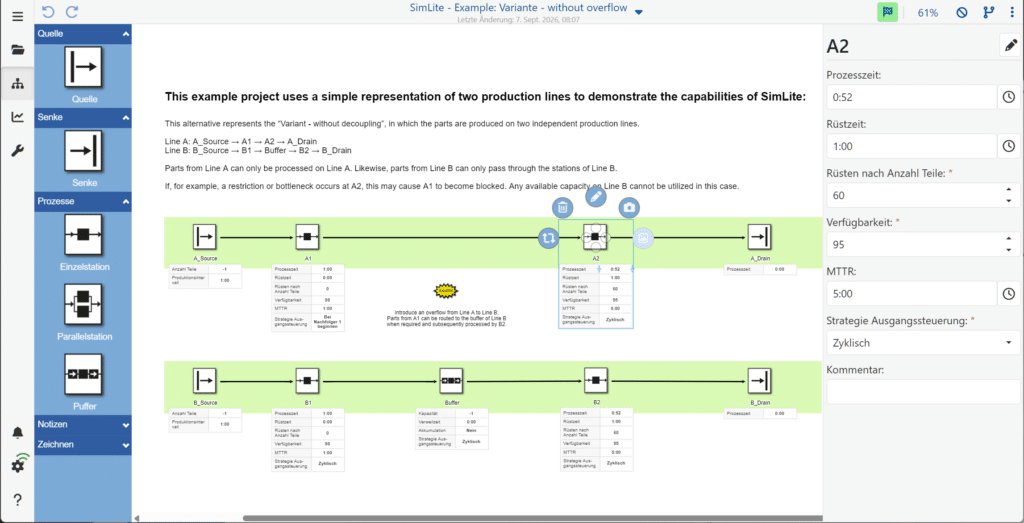
SimLite is SimPlan’s mobile application for the rapid creation of simple simulation models using drag-and-drop. Based on simplified Plant Simulation objects, the tool provides a straightforward introduction to modelling, even without prior experience in simulation.
The tool allows simple simulation models to be created directly on a mobile device. Modelling is carried out intuitively via drag-and-drop and is based on simplified objects from Plant Simulation. SimLite thus offers a straightforward introduction to modelling and enables initial models and variants to be created quickly. Various functions support not only the actual modelling, but also the documentation and versioning of different model variants.
From idea to model via drag-and-drop
A comprehensive simulation model is not always required straight away for every problem. Particularly in early planning phases, the initial focus is on mapping out processes and interrelationships and examining different variants.
With SimLite, models can be built directly on a mobile device using drag-and-drop. Simplified Plant Simulation objects make modelling easier and reduce the complexity of the creation process.
This allows initial model ideas to be implemented quickly and different variants to be developed in a structured manner.
Functions for modelling and variant comparison
SimLite supports users through various steps involved in creating and managing simple models:
- Modelling via drag & drop
- Use of simplified Plant Simulation objects
- Creation of different model variants
- Documentation of models
- Versioning of model variants
- Use on mobile devices
This allows models not only to be created, but also for different stages of development and variants to be managed in a traceable manner.
Frequently Asked Questions (FAQ)
What is SimLite?
SimLite is a mobile application for creating simple simulation models. Models are built using drag-and-drop from simplified Plant Simulation objects.
Who is SimLite suitable for?
SimLite is suitable for users who wish to map out processes and initial model ideas with minimal effort. The app is particularly helpful for a straightforward introduction to modelling and for exploring different variants.
SimLite also offers users familiar with the Plant Simulation environment the opportunity to create simplified models on the go and to explore model variants at an early stage.
Do I need experience with Plant Simulation?
No. Thanks to the simplified objects and intuitive drag-and-drop modelling, SimLite is also suitable for users who wish to gain initial experience with simulation and modelling.
Can I create different model variants with SimLite?
Yes. SimLite supports the creation, documentation and versioning of different model variants. This allows different approaches to be mapped out in a structured manner and development stages to be tracked.
On which devices can SimLite be used?
SimLite is designed for use on mobile devices and enables you to create and edit models directly on the go.
Get to know SimLite
Would you like to know whether SimLite is suitable for your specific task? Please get in touch. We’d be happy to demonstrate the application and discuss potential areas of use with you.
We’d be happy to advise you on using SimLite in your organisation!
Further information and downloads
SimLite is available for iOS in the Apple Store.