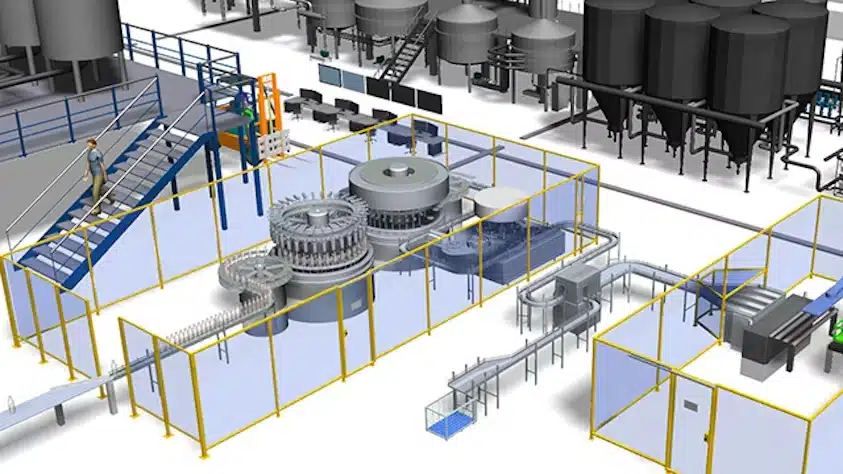
Plant Simulation – software for material flow simulation, production planning and digital twins
Introduction to the tool
Plant Simulation is a widely used software for simulating complex production and logistics systems. It helps companies analyse processes, identify bottlenecks and make data-driven decisions. The tool has been a standard in factory simulation for many years and is a central element of Siemens Digital Industries Software.
Object-oriented modelling allows even extensive production lines, storage areas or transport processes to be realistically mapped. Plant Simulation is suitable for both beginners who want to gain initial experience in simulation and advanced users who develop detailed digital twins.
Areas of application and typical uses
Plant Simulation is used in numerous industries, particularly in manufacturing and logistics. Common use cases include:
- Analysis of material flows and identification of bottlenecks
- Planning of new production lines or logistics areas
- Evaluation of variants and investment alternatives
- Determination of realistic throughput values and lead times
- Reducing inventories and waiting times
- Investigating the effects of order fluctuations or layout changes
- Preparing and supporting virtual commissioning
For beginners, the software offers clearly structured building blocks and numerous sample models, making it easier to get started with modelling.
Key features and strengths
Plant Simulation provides comprehensive tools that support the entire modelling process. These include:
- Object-oriented modelling with reusable building blocks
- Many standard objects for material flow, transport, storage or layout design
- Statistical evaluations, including interval statistics, instantaneous statistics and overall statistics
- Analysis tools such as automatic bottleneck analysis, Sankey diagrams or Gantt charts
- Support for experiments and variant comparisons
- Options for optimising parameters such as batch sizes or control rules
The graphical working environment keeps modelling clear, even when systems become very complex.
Structure and available modules
Plant Simulation offers a flexible environment that users can expand with libraries and their own building blocks. Important components include:
- Integrated neural networks to support data-driven decisions
- Functions for factor analysis and statistical evaluation
- Experiment manager for systematic variant studies
- Tools for automated optimisation
- Planning aids for sequences and batch sizes
These modules are particularly helpful for beginners, allowing them to build simulations in a structured way and expand them step by step.
Versions and licence models
Commercial licences for businesses and industry
Plant Simulation commercial licences are designed for businesses, industry and public institutions with industrial projects. They offer the full range of functions for modelling, simulation and optimisation of complex systems. You can choose between modern Plant Simulation X Cloud licences on a subscription basis and classic on-premise licences, which are available as subscription or purchase versions. The scope of services ranges from the entry-level version to the Professional or Advanced versions.
Akademische Lizenzen für Lehre und Forschung
Für Hochschulen, Forschungseinrichtungen und Studierende gibt es spezielle akademische Lizenzen, deren Nutzung strikt auf nicht wirtschaftliche Zwecke beschränkt ist. Modelle aus diesen NON-PROFIT Lizenzen können nicht in kommerziellen Versionen geöffnet werden. Diese Lizenzformen unterstützen Lehrveranstaltungen und wissenschaftliche Projekte mit realitätsnahen Simulationsmöglichkeiten.
Download a free test version.
Integration and interfaces
Plant Simulation can be integrated into many software environments. Data can be exchanged not only at the beginning or end, but also during the simulation. Available interfaces include:
- ODBC (e.g. for MS Access or SQL Server)
- ActiveX and mailbox
- Socket-based communication
- Coupling with ARIS or other planning systems
This enables a close connection to MES, ERP or other IT systems.
Industry-specific building block sets
Building block sets are specialised software libraries that bundle standard functionalities of frequently used model components (machines, warehouses, conveyor technology). They serve to greatly accelerate the model creation of complex systems.
Examples of specific building block sets developed by SimPlan:
- Automotive: For typical processes in body shop, paint shop and assembly.
- VSM – Value Stream Mapping: For simulating and analysing value streams.
- SimSuite (Warehouse / Logistics): For the efficient creation of simulations of highly automated logistics systems.
- SimChain (SCM): For simplified modelling and analysis of supply networks.
- Special solutions for shipbuilding (STS) and photovoltaics/solar manufacturing.
Here you will find an overview of all building block sets.
Frequently asked questions (FAQ)
Which version is suitable for beginners
The student version or an academic version (Plant Simulation Research) is suitable for beginners if it is for non-commercial use. For initial company projects, a commercial licence with basic scope is usually used, e.g. Plant Simulation X Essentials.
Are programming skills necessary?
No programming skills are required for simple material flow models. Programming can be useful for more complex logic or individual building blocks, but remains optional.
How realistic can models be represented?
Plant Simulation enables a detailed representation of processes, transports, waiting times or control rules. Extensive analysis tools allow realistic forecasts to be made.
Can the software work with real data?
Yes. Data from Excel, databases or ERP systems can be integrated via interfaces. Ongoing data exchange during simulation is also possible.
What is the best way to get started as a beginner?
To begin with, we recommend a small model with standard components such as processing stations, buffers and means of transport. Sample models help with understanding. Through gradual expansion, the model grows with your own experience.
Can I make models available to other people?
Models can be shared as project files or stored via central systems. Companies often use a shared model storage system or store variants within the experiment management system.
Manufacturer / Reference
SimPlan AG is an official distribution partner (Smart Expert) of Siemens Digital Industries Software, which develops Plant Simulation. SimPlan is also an academic partner of Siemens and thus the exclusive distribution partner in Germany for all non-profit licences (use for non-commercial purposes only).
You can have a detailed look at the different license types, the range of functions as well as the system requirements on our product page www.plant-simulation.